

Creating the models.py, views.py, urls.py, admin.py & the superuser

In writing models in Django, we have to follow the coding standards that are stated in the docs. A few pointers to remember are all field names should be in lower case, and should be using underscores instead of camelCase. The next tip is that the class Meta: should always be first after defining the fields, then the standard methods after. Like this:
class Meta:
    ...

def __str__(self)
    ...

def save()
    ...

def get_absolute_url()
    ...
And since our app has choices, as shown in the figure above, Django's coding style suggests that we define the choice as a list tuple with an all-uppercase name as a class attribute on the model.
Now let's start.
# blog_tutorial/main/models.py
from django.db import models
from django.utils.translation import ugettext_lazy as _
from django.urls import reverse

STATUS_CHOICES = [
    ("draft", "Draft"),
    ("published", "Published"),
]


class Project(models.Model):
    """ This model defines our Project class which will
        handles the portfolio of the user.
    """
    title = models.CharField(max_length=100)
    slug = models.SlugField(max_length=140, default=title)
    image = models.ImageField(upload_to="projects/", blank=True)
    live_site = models.CharField(max_length=255)
    github_link = models.CharField(max_length=255)
    description = models.TextField()

    class Meta:
        """ Meta for the naming in the django admin that
            describes a model if the object is singular or
            plural
        """
        verbose_name = _("Project")
        verbose_name_plural = _("Project")

    def __str__(self):
        """ Returns the title of Project models instead
            of a primary key
        """
        return self.title


class Category(models.Model):
    """ This model defines the categories field in the Post model
        with a ManyToManyField.
    """
    title = models.CharField(max_length=140)
    slug = models.SlugField(max_length=140, default=title)

    class Meta:
        """ Meta for the naming in the django admin that
            describes a model if the object is singular or
            plural
        """
        verbose_name = _("Category")
        verbose_name_plural = _("Category")

    def __str__(self):
        """ Returns the title of Project models instead
            of a primary key
        """
        return self.title

    def get_context_data(self, **kwargs):
        context = super(self).get_context_data(**kwargs)
        context['posts'] = Post.objects.filter('category')
        return context

    def get_absolute_url(self):
        return reverse("category-list", kwargs={"slug": self.slug})


class Post(models.Model):
    """ The main model that defines the Post class which
        has a relationship with the Category class
    """
    title = models.CharField(max_length=140)
    slug = models.SlugField(max_length=140, default=title)
    overview = models.CharField(max_length=255)
    body = models.TextField()
    image = models.ImageField(upload_to="blog/")
    created_on = models.DateField()
    updated_on = models.DateField()
    categories = models.ManyToManyField(Category, related_name='posts')
    status = models.CharField(max_length=10, choices=STATUS_CHOICES, default="draft")

    class Meta:
        """ Meta for the naming in the django admin that
            describes a model if the object is singular or
            plural
        """
        verbose_name = _("Post")
        verbose_name_plural = _("Post")

    def __str__(self):
        """ Returns the title of Project models instead
            of a primary key
        """
        return self.title


class Contact(models.Model):
    """ The Contact model that accepts name, email and message
        in the contact page.
    """
    name = models.CharField(max_length=100)
    email = models.EmailField()
    message = models.TextField()

    class Meta:
        """ Meta for the naming in the django admin that
            describes a model if the object is singular or
            plural
        """
        verbose_name = _("Contact")
        verbose_name_plural = _("Contact")

    def __str__(self):
        """ Returns the title of Project models instead
            of a primary key
        """
        return self.name
In writing views.py for a Django app, Class Based Views are written much simpler than the Function Based views. Here's an example:
# FBV
# views.py
def blog_index(request):
    blogs = Post.objects.all()
    context = {
    "blogs": blogs,
    }
    return render(request, "pages/blog_index.html", context)
# blog_index.html
{% for blog in blogs %}
    {{ blog.title }}
    ...
{% endfor %}
# CBV
# views.py

class BlogListView(ListView):
    model = Post
    template_name = 'pages/blog.html'
    context_object_name = 'posts'
# blog_list.html
{% for post in object_list %}
    {{ post.title }}
    ...
{% endfor }}
Both views above render the same data. But can you see which one's simpler? Yep, that's how concise Class-Based Views are. Now let's write our views.py for our blog
# main/views.py

from django.contrib import messages
from django.shortcuts import render
from django.views.generic import DetailView
from django.views.generic.list import ListView
from django.views.generic.edit import FormView
from django.views.generic import TemplateView

from blog_tutorial.main.models import (
    Post,
    Category,
    Project,
    Contact,
)

from blog_tutorial.main.forms import ContactForm

class ProjectListView(ListView):
    model = Project
    paginate_by = 5
    template_name = 'pages/projects.html'
    context_object_name = 'projects'


class ProjectDetailView(DetailView):
    model = Project
    template_name = 'pages/project_details.html'


class BlogListView(ListView):
    model = Post
    paginate_by = 4
    template_name = 'pages/home.html'
    context_object_name = 'posts'
    ordering = ['-created_on']


class BlogDetailView(DetailView):
    model = Post
    template_name = 'pages/post_detail.html'


def blog_category(request, category):
    posts = Post.objects.filter(
        categories__slug__contains=category
    )
    context = {
        "category": category,
        "posts": posts
    }
    return render(request, "pages/category_list.html", context)


class ContactFormView(FormView):
    template_name = 'pages/contact.html'
    form_class = ContactForm
    success_url = '/contact/'

    def form_valid(self, form):
        name = form.cleaned_data['name']
        email = form.cleaned_data['email']
        message = form.cleaned_data['message']

        m = Contact(
            name=name,
            email=email,
            message=message,
        )
        m.save()

        messages.success(self.request, 'Your message has been sent.')

        return super().form_valid(form)


class AboutView(TemplateView):
    template_name = 'pages/about.html'
Let's create the forms.py
from django import forms
from django.utils.translation import ugettext_lazy as _
from crispy_forms.helper import FormHelper
from crispy_forms.layout import Submit, Field


class ContactForm(forms.Form):
    def __init__(self, *args, **kwargs):
        super(ContactForm, self).__init__(*args, **kwargs)
        self.helper = FormHelper()

        self.helper.form_method = 'post'
        self.helper.form_action = '/contact/'
        self.helper.form_class = "form-group"
        self.helper.form_id = 'contact-form'

        self.helper.add_input(Submit('submit', 'Submit'))

    name = forms.CharField(max_length=100, label="Your name", widget=forms.TextInput(attrs={'class': 'col', 'placeholder':'Vicente Reyes'}))
    email = forms.CharField(label="Your email", widget=forms.EmailInput(attrs={'class': 'col', 'placeholder':'highcenbugtv@vgreyes.com'}))
    message = forms.CharField(max_length=500, label="Your inquiry", widget=forms.Textarea(attrs={'placeholder':'I need to...'}))
To view our models' data that are passed to the views, we have to pass the views to our URLs.
# urls.py
...

from blog_tutorial.main.views import (
    BlogListView,
    BlogDetailView,
    blog_category,
    ContactFormView,
    ProjectListView,
    ProjectDetailView
)

urlpatterns = [
    path("", BlogListView.as_view(), name="home"),
    path( "about/", TemplateView.as_view(template_name="pages/about.html"), name="about"),
    # Django Admin, use {% url 'admin:index' %}
    path(settings.ADMIN_URL, admin.site.urls),
    # User management
    path("users/", include("blog_tutorial.users.urls", namespace="users")),
    path("accounts/", include("allauth.urls")),
    # Your stuff: custom urls includes go here
    path("blog/<slug:slug>/", BlogDetailView.as_view(), name="blog-detail"),
    path("blog/category/<slug:category>/", blog_category, name='categories'),
    path("portfolio/", ProjectListView.as_view(), name="portfolio"),
    path("portfolio/<slug:slug>", ProjectDetailView.as_view(), name="project-details"),
    path("contact/", ContactFormView.as_view(), name="contact"),
] + static(settings.MEDIA_URL, document_root=settings.MEDIA_ROOT)
Now let's migrate our models and create our superuser to access the admin.
$ python manage.py makemigrations && python manage.py migrate && python manage.py createsuperuserUsername: admin
Email address:
Password:
Password (again):
Superuser created successfully.
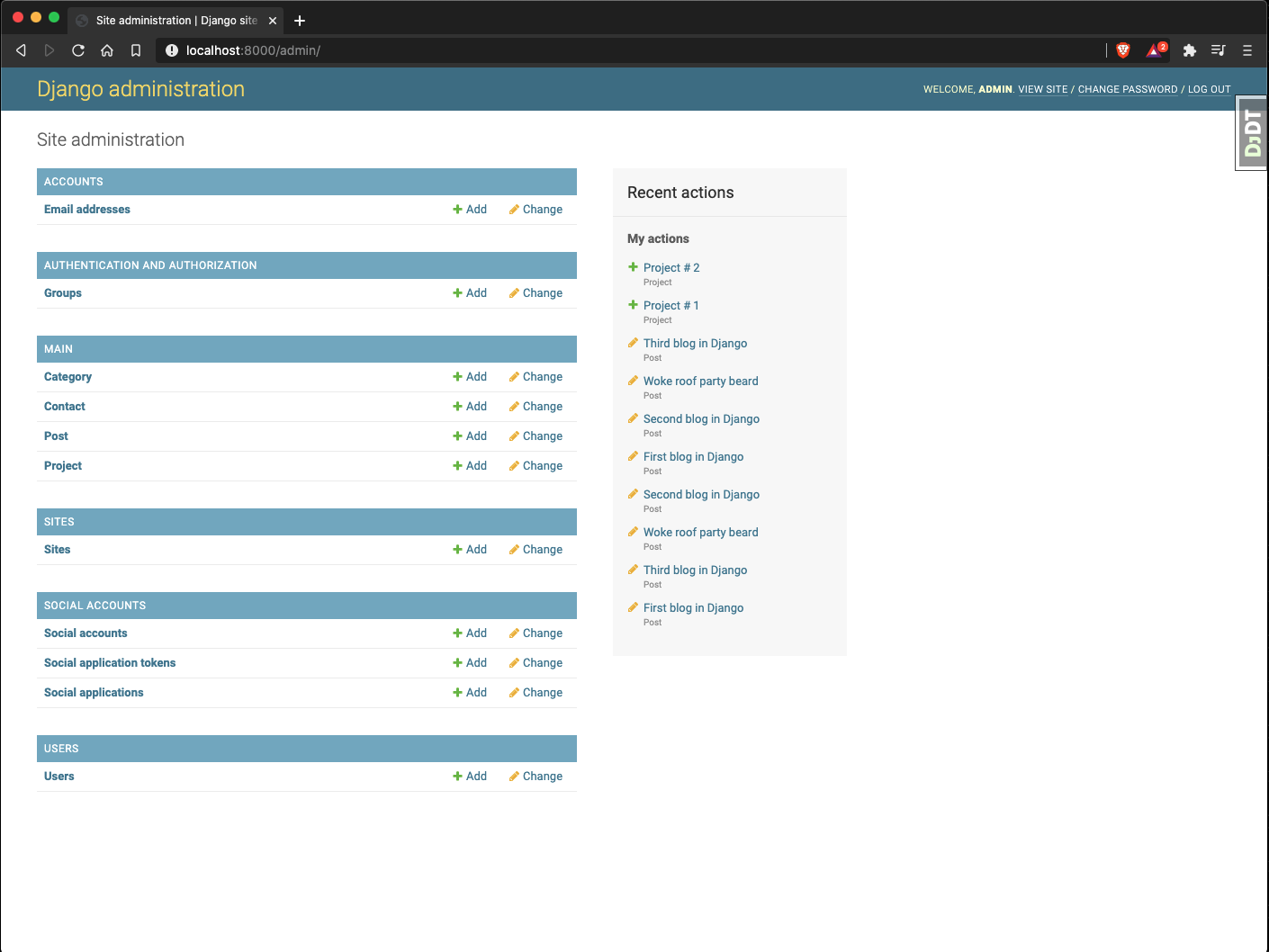
Now for the admin, we're using one of the included features of Cookiecutter-Django that can generate an admin.py file called django-extensions.
We'll run one command to generate the file:
$ python manage.py admin_generator main
The command's output is:
# -*- coding: utf-8 -*-
from django.contrib import admin

from .models import Project, Category, Post, Contact


@admin.register(Project)
class ProjectAdmin(admin.ModelAdmin):
    list_display = (
        'id',
        'title',
        'slug',
        'image',
        'live_site',
        'github_link',
        'description',
    )
    search_fields = ('slug',)


@admin.register(Category)
class CategoryAdmin(admin.ModelAdmin):
    list_display = ('id', 'title', 'slug')
    search_fields = ('slug',)


@admin.register(Post)
class PostAdmin(admin.ModelAdmin):
    list_display = (
        'id',
        'title',
        'slug',
        'overview',
        'body',
        'image',
        'created_on',
        'updated_on',
        'status',
    )
    list_filter = ('created_on', 'updated_on')
    raw_id_fields = ('categories',)
    search_fields = ('slug',)


@admin.register(Contact)
class ContactAdmin(admin.ModelAdmin):
    list_display = ('id', 'name', 'email', 'message')
    search_fields = ('name',)
Let's run the Django development server and head over to http://localhost:800
Watching for file changes with StatReloader
INFO 2020-07-22 14:59:07,112 autoreload 47052 4566134208 Watching for file changes with StatReloader
Performing system checks...

System check identified no issues (0 silenced).
July 22, 2020 - 14:59:15
Django version 3.0.8, using settings 'config.settings.local'
Starting development server at http://127.0.0.1:8000/
Quit the server with CONTROL-C.
About the author
Python Developer | Audio Editor | Technical Writer | OSS Contributor | Tag Moderator @ @ThePracticalDEV | Valorant TonyPoppins #881488
Comments
Join the discussionNo comments yet. Be the first to comment.
Creating a blog with Cookiecutter-Django & deploying it to Heroku
Learn to jumpstart a production-ready blog using the Cookiecutter-Django framework and how to deploy it to Heroku


